Plainwork / Catalogue / Datebook for Ghost
Events for your Ghost site, listed by event date
For clubs, community groups, venues and local newsletters on Ghost 6: tag a post as an event and get an events page with upcoming, past and month views, plus add-to-calendar on every event.
- source-datebook.zip: Ghost's Source theme (1.7.6) with Datebook built in, ready to upload: events page template, homepage "Upcoming events" block, event box on posts, event labels on post cards
- casper-datebook.zip: Ghost's Casper theme with the events page template and event box
- add-to-any-theme: the Handlebars partials, 9 KB of CSS, 21 KB of dependency-free JavaScript (about 6 KB gzipped) and a generic page template, with step-by-step edits for your own theme
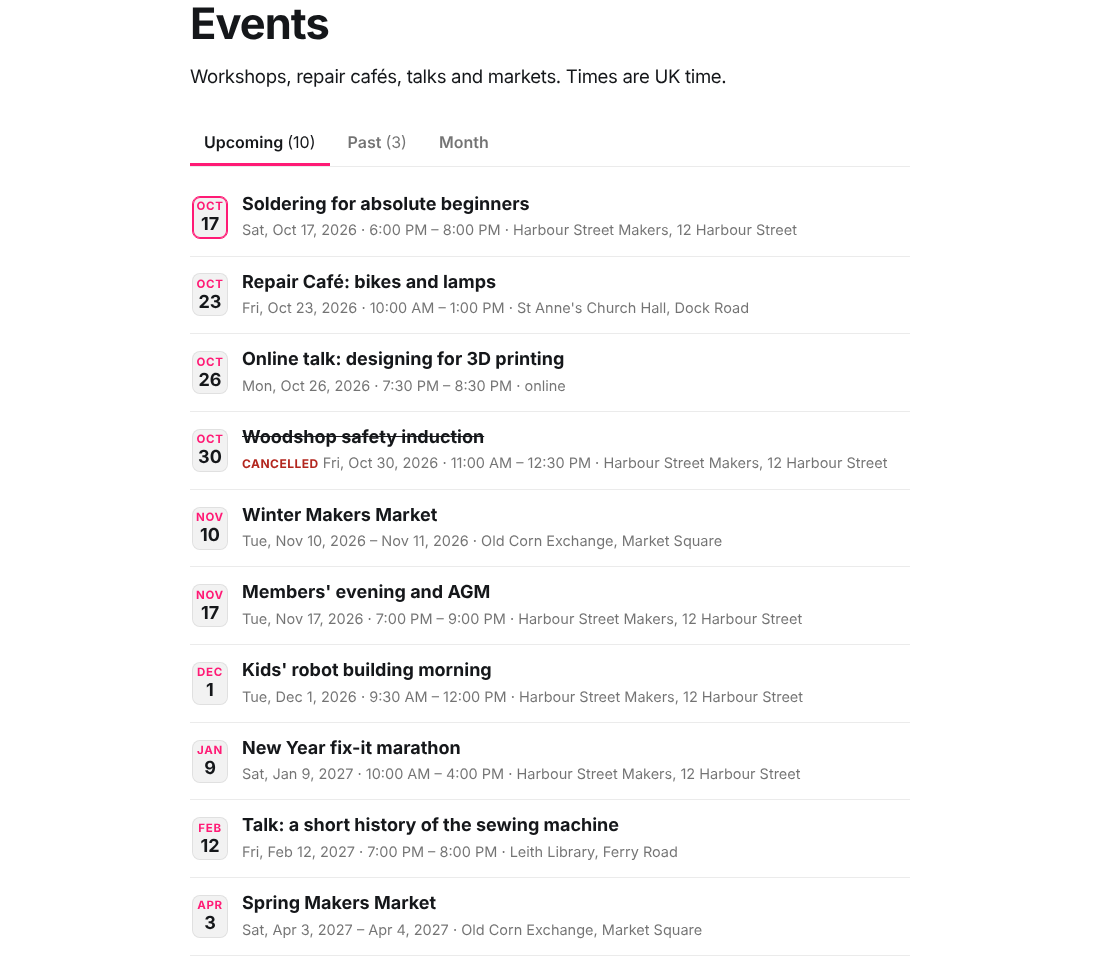
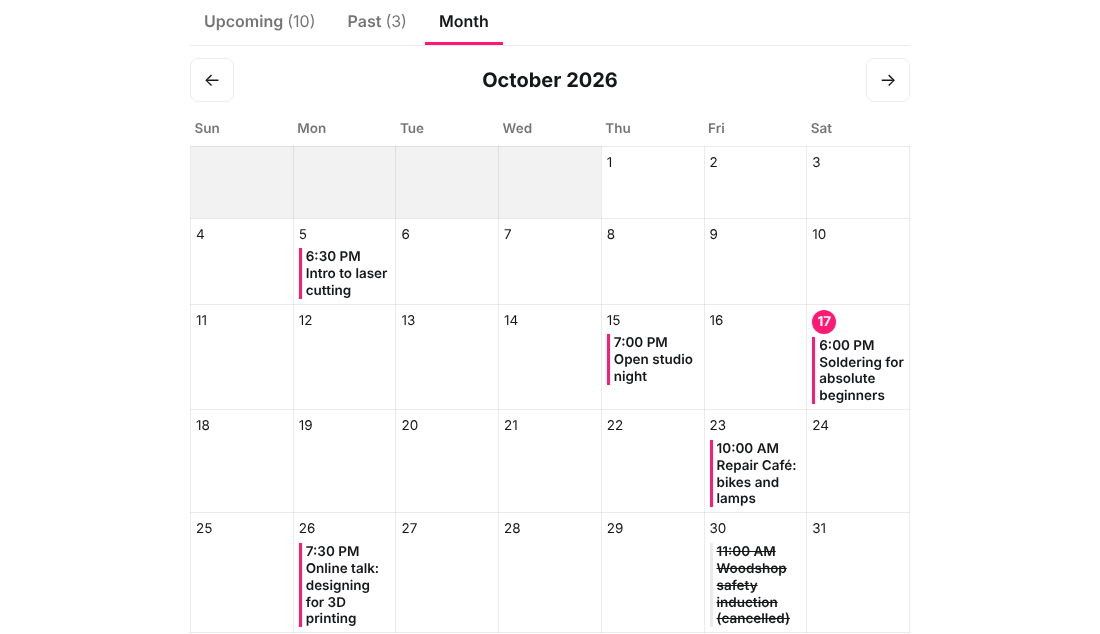
- Events page: Upcoming (soonest first), Past and Month tabs, sorted by the event date in your site's time zone, keyboard-operable, and a plain list when JavaScript is off
- Event box: date badge, time range, venue, today/ended/cancelled status, Add to calendar (Google, Outlook, .ics) and a time-zone note for visitors elsewhere
- schema.org Event structured data on every event post (scheduled or cancelled, in person or online)
- Guide: install, editor cheat sheet, time-zone rules, troubleshooting, known limits; changelog; licence for client sites
Open the live demo: a fictional makerspace with 13 sample events, rendered by the kit's Source theme on Ghost 6.71 and saved as static pages. Switch between Upcoming, Past and Month; open an event to see the event box.
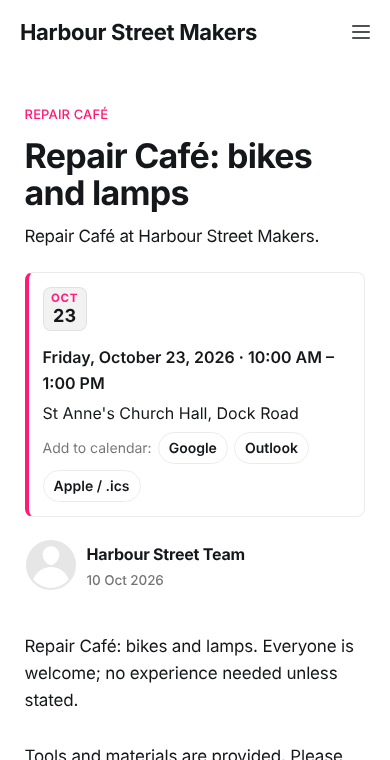
What the editor typed for that event, as tags on an ordinary post:
#event
#when 2026-10-23 10:00
#until 13:00
#venue St Anne's Church Hall, Dock Road
Tested on self-hosted Ghost 6.71.0 with both themes, which pass gscan 6.6.1 for Ghost 6 with no errors. 26 browser tests cover date parsing, daylight-saving changes (London, New York, Sydney, Kolkata), RFC 5545 escaping and line folding, and the upcoming/past rule. Ghost(Pro) was not tested directly; it runs current Ghost 6 and needs a plan that allows custom themes.
Made for
Who it's for
Events stay Ghost posts
Same editor, newsletters, member access and search. No custom fields, core fork, Zapier or third-party calendar embed.
Sorted by when it happens
Publish the announcement any time. The events page orders by the date in the #when tag and moves finished events to Past automatically.
Readers can add it to their calendar
Google, Outlook and .ics buttons convert your local time to the right moment in the reader's own calendar, across daylight-saving changes.
Mistakes show up, not wrong dates
A tag like #when 5 Dec is flagged on the page with the expected format, instead of quietly showing the wrong date.
No monthly fee
Embedded calendar widgets charge from $2 a month (Elfsight's paid plans start at $5) and keep your events outside Ghost. This is a one-time $29 for every site you run or build.
What's inside
Everything you get
How it works
From checkout to done
Buy
Buy and download the zip.
Open
Upload source-datebook.zip (or casper-datebook.zip) in Ghost Admin and create an Events page with the Events template.
Use
Tag a post #event and #when 2026-12-05 19:00: it appears on the events page, sorted by date.
Questions
Good to know
Which Ghost versions does it work on?
Ghost 6.5.3 or newer, because it uses Ghost's split helper added in 6.5. Tested on self-hosted Ghost 6.71.0. Ghost 5 is not supported. On Ghost(Pro) you need a plan that allows custom themes; the Starter plan only allows official themes.
Does it work with my own theme?
Yes, with a few edits: copy two folders and a template into your theme and add four lines (stylesheet, script, event box, optional homepage block). The guide lists each edit. The same steps were used to build the Casper version.
Why tags and not a date field?
Ghost has no custom fields. Internal tags (starting with #) are hidden from readers, filterable by themes and need no plugin, so events keep working through Ghost updates without a forked core.
What about time zones?
Times are typed in your site's time zone and shown as typed. The upcoming/past split uses the site's time zone for every visitor, visitors elsewhere see a note with their local time, and calendar buttons convert to UTC.
Is there a limit on the number of events?
The events page reads the 100 most recently published event posts, Ghost's default maximum per request. Upcoming events are recent announcements, so this only trims the oldest past events on very busy sites.
Can I use it for client sites?
Yes: one licence covers any number of sites you run or build for clients. You may not resell or redistribute the kit itself.
Can I buy it on Gumroad instead?
Yes, the same kit is on Gumroad at https://digitalplains.gumroad.com/l/datebook-for-ghost-d20261017a22 (priced in SGD, about the same as $29).
What if it doesn't work for me?
If it doesn't work as described or you can't access it, email us within 14 days and we'll fix it or refund you. See the refund policy for details.
Datebook for Ghost
Events for Ghost 6: upcoming, past and month views, add-to-calendar, Event schema. Source and Casper ready to upload. One-time $29.
More from the catalogue
Other small tools
Pinfix
Pin GitHub Actions to commit SHAs and Docker images to digests from your editor or CLI. Free quick fix, Pro key $9 one-time.
Store Text Draft
AI-written App Store and Google Play text from your facts: limits, store rules and keyword field handled; nothing invented.
Polyglot for Ghost
Multilingual Ghost on one install: routes, hreflang, language switcher, menus and strings, a patched Source theme and a CLI. One-time $29.