Plainwork / Catalogue / Loose Ends
A TODO list for VS Code that updates can't break
Every TODO, FIXME and HACK in your workspace in one list, without the ripgrep binary that broke Todo Tree in VS Code 1.122. Free in VS Code. Pro ($9 once) shows how old each item is and what's overdue.
- Free: every TODO, FIXME, HACK, BUG and XXX in the workspace, grouped by tag or file; click to jump to the line
- Free: tag highlights in the editor, status bar count, filter, current-file view, live updates as you type
- Free: uses your existing Todo Tree tags; no ripgrep or other binary to install or configure
- Pro: age and last author of every item from local git blame, with stale items marked
- Pro: group by owner, age or due date; overdue TODO(@sam 2026-11-01) items in the Problems panel
- Pro: export a Markdown or CSV TODO report for a PR, issue or sprint doc
- Get it: not on the VS Code Marketplace yet (listing coming, publisher Plainwork); download the free VSIX below and use Install from VSIX. The Pro key unlocks Pro in this build and comes instantly after checkout
Not on the VS Code Marketplace or Open VSX yet (the listings are coming, publisher Plainwork). You can use it today: download the free VSIX (26 KB), then in VS Code, Cursor or VSCodium open the Extensions view, click the … menu at the top and choose Install from VSIX…. The Pro key works in this build.
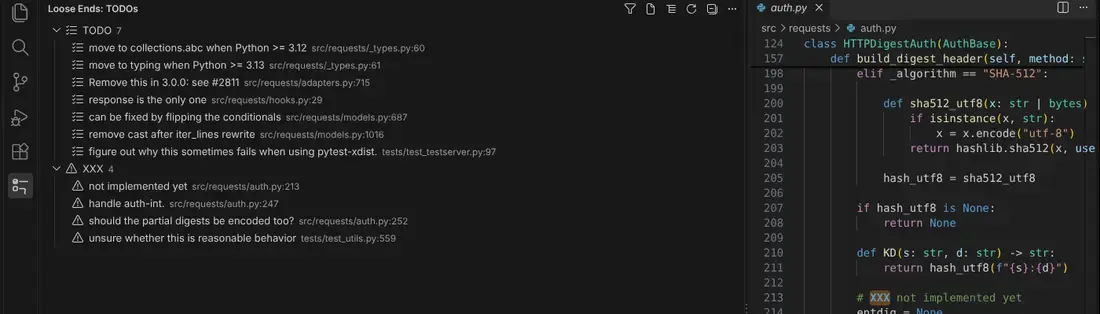
Free: the list above is a real screenshot of Loose Ends in VS Code 1.142 on psf/requests, grouped by tag, with the tag highlighted in the editor.
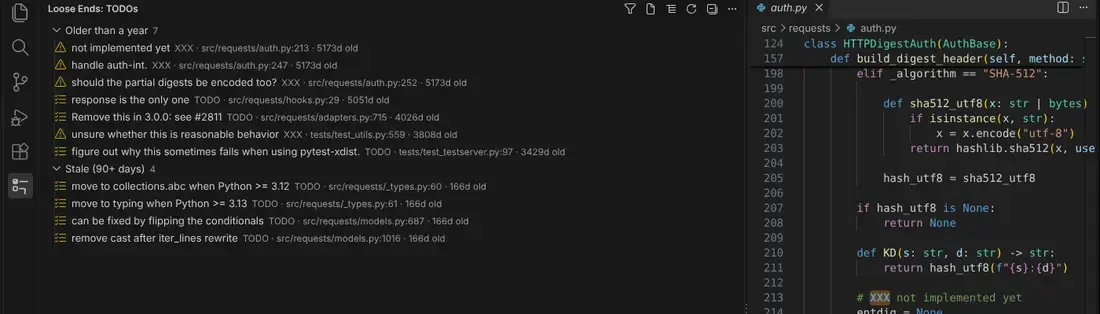
Pro, grouped by age from git blame (real screenshot, same repository).
Pro report, exported as Markdown from the same repository on 17 October 2026 (first 4 of 11 rows, all columns; on this page we shortened author names to initials). Owner and Due are empty because no comment in this repository names an owner or a due date; "Last changed by" is the git author of the line, not an owner:
- 11 open items (7 TODO, 4 XXX)
- 0 overdue
- Oldest: 5172 days
| Where | Tag | Text | Owner | Last changed by (git) | Due | Age (days) |
|---|---|---|---|---|---|---|
src/requests/auth.py:213 | XXX | not implemented yet | P. M. | 5172 | ||
src/requests/auth.py:247 | XXX | handle auth-int. | P. M. | 5172 | ||
src/requests/auth.py:252 | XXX | should the partial digests be encoded too? | P. M. | 5172 | ||
src/requests/hooks.py:29 | TODO | response is the only one | K. R. | 5051 |
"Age" is how long ago git last changed that line, from git blame. Todo Tree broken instead? Read the fix.
Made for
Who it's for
Nothing to find, nothing to break
Loose Ends reads files through VS Code's own file APIs. There's no bundled binary path for an update to move, which is exactly what broke Todo Tree in May 2026.
Switch in a minute
Install it and your existing todo-tree.general.tags are used until you set your own. Same comment syntax, same habits.
Fast enough for real repositories
Measured in VS Code 1.142 on a clone of facebook/react (7,260 files): a full scan in about 2.1 seconds, 1,229 items found. After that only the file you change is rescanned.
Private
No telemetry and no account. The free list makes no network requests. Pro sends only your key to our licence server, at most every 10 minutes, and runs git locally.
What's inside
Everything you get
How it works
From checkout to done
Buy
Buy a $9 Pro key and copy it from the page you land on after checkout. The free list needs no key.
Open
Download the VSIX from this page and install it: Extensions view, … menu, Install from VSIX (VS Code, Cursor or VSCodium). The list appears right away.
Use
Run "Loose Ends: Enter Pro key" in the Command Palette and paste the key to turn on git age, overdue warnings and the report.
Questions
Good to know
Do I have to uninstall Todo Tree?
No, but you don't need both. Loose Ends reads Todo Tree's tag setting, so you can disable Todo Tree and keep your configuration.
Which comments does it find?
A tag counts when it starts a comment (//, #, /*, a * continuation line, <!--, --, ;, %) or a line, also after a Markdown list item or checkbox. Tags are whole words and case-sensitive by default, so TODOS, todo_list and a bare 'TODO' inside a string are ignored. A string that itself looks like a comment, such as "# TODO …", is listed, as in Todo Tree.
Does it work in Cursor, VSCodium, Remote SSH and WSL?
It only uses standard VS Code extension APIs and needs no binary, so it is built to work wherever VS Code extensions run. We tested it end to end in VS Code 1.142 on Linux. It is not on the Marketplace or Open VSX yet; in Cursor and VSCodium, install the free VSIX from this page with Install from VSIX in the Extensions view.
What does the Pro key cost and how long does it last?
$9 once, no subscription, for your own use on your machines. The key is checked with our licence server at most every 10 minutes; if you're offline, Pro features pause and everything free keeps working.
Is the git age the date the TODO was written?
It's the date git last changed that line, from git blame. If someone edited the line later, the age restarts. Lines not committed yet show as new.
Can I get a refund?
Yes, within 14 days under our refund policy: email [email protected].
What if it doesn't work for me?
If it doesn't work as described or you can't access it, email us within 14 days and we'll fix it or refund you. See the refund policy for details.
Loose Ends
Ripgrep-free TODO tree for VS Code: list, highlights, filter. Pro adds git age, overdue warnings and a report.
More from the catalogue
Other small tools
Pinfix
Pin GitHub Actions to commit SHAs and Docker images to digests from your editor or CLI. Free quick fix, Pro key $9 one-time.
Store Text Draft
AI-written App Store and Google Play text from your facts: limits, store rules and keyword field handled; nothing invented.
Polyglot for Ghost
Multilingual Ghost on one install: routes, hreflang, language switcher, menus and strings, a patched Source theme and a CLI. One-time $29.