Plainwork / Catalogue / Foliokit
Print-ready invoices, quotes and reports from JSON
Seven business documents as plain HTML and CSS, plus a command that fills them from JSON or Markdown and prints a PDF with the Chrome you already have. No npm, no LaTeX.
- 7 templates: invoice, quote, receipt, statement (up to 2,000 lines, header repeats on every page), letter, certificate and a Markdown report with cover
- The foliokit command: pdf, html, md, init, list and check. Zero npm dependencies; it uses the Chrome or Chromium you have
- Exact money: discount, tax per rate, amount paid and due in whole cents; 0, 2 and 3-decimal currencies; any locale
- A sample data file for every template, a field reference, customising notes, a print CSS guide and wkhtmltopdf migration notes
- 102 tests that pass from a fresh unzip, a licence for client work and a changelog
- Footers with Page X of Y (Chrome 131 or newer), tagged PDFs, A4 and Letter, logo and accent colour
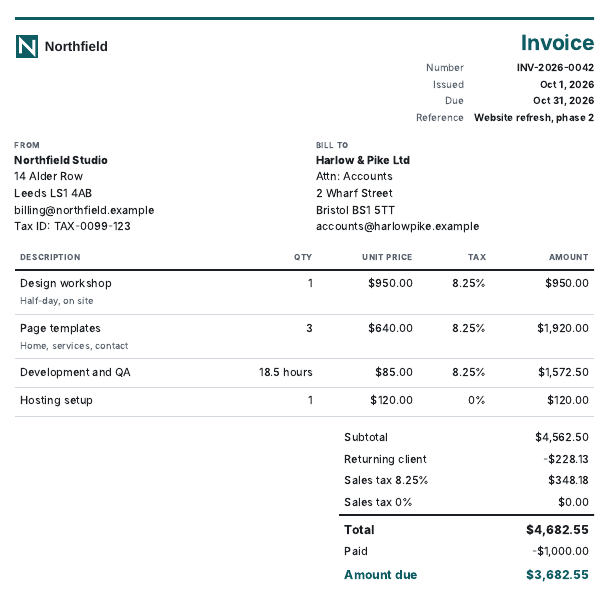
Open the live demo (the invoice and report templates, with their PDFs). Read back from the PDF text of the sample invoice: Subtotal $4,562.50, Total $4,682.55, Amount due $3,682.55. The statement template ran to 4 pages for 46 rows with the column heads repeated on each.
Free tools from the same kit: Markdown to PDF in your browser, the page-breaks guide.
The top of page 1 of the real PDF, printed by node foliokit.mjs pdf invoice data/invoice.json invoice.pdf (one page, Letter size):
Made for
Who it's for
Finished, not a starting point
Each template has the details people forget: repeating table heads, rows that never split, totals that stay together, a footer with page X of Y and a cover that skips it.
Totals that add up
Money is kept in whole minor units and rounded once per line and once per tax rate. A test builds 200 random invoices and checks that lines, discount, tax and total always agree to the cent.
Nothing to install
Node 18 and a Chrome or Chromium you already have. No npm packages, no LaTeX, no cloud service, and your documents never leave your machine.
Honest about its limits
Tested on Chromium 141 on Linux. No page-numbered contents list (Chrome cannot), no tax-inclusive prices, no e-invoice formats. The README and the product page say so before you buy.
What's inside
Everything you get
How it works
From checkout to done
Buy
Buy and download the zip, then unzip it anywhere.
Open
Run node foliokit.mjs init invoice mydocs to get a sample data file.
Use
Edit it and run node foliokit.mjs pdf invoice mydocs/invoice.json mydocs/invoice.pdf.
Questions
Good to know
Which Chrome do I need?
Chrome or Chromium (Edge shares the engine and is looked for too, but was not tested). Version 131 or newer is needed for the Page X of Y footers; the command checks and warns. It was tested on Chromium 141 on Linux. Windows and macOS Chrome were not tested, and the PDF is made by Chrome only.
Does it work inside Docker or CI?
Yes, with a Chrome or Chromium installed in the image. Running as root needs the --no-sandbox flag, which the command accepts and explains when Chrome refuses to start.
Is an invoice made with this valid in my country?
The kit formats the information you give it and gives no legal, tax or accounting advice. Many places require specific fields (a tax number, a sequential number, a supply date); put them in the data. E-invoice formats such as Factur-X are not supported.
Can I use it for client work?
Yes. You can use and edit the templates in your own and your clients' projects with no limit on documents. You may not resell or publish the kit itself. The licence is in the zip.
Can I use my own font and logo?
A logo (png, jpg, svg, gif or webp up to 1 MB) goes in the data file and is embedded. Fonts: install the font on the machine that prints and put its name first in templates/base.css. Fonts are not bundled.
How is this different from Playwright, Puppeteer or WeasyPrint?
Those are engines that turn HTML into PDF. Foliokit is the documents themselves, already tested for page breaks and totals, plus a command that runs them. You could write one invoice template in an afternoon; the seven finished, tested documents are what you pay for.
What if it doesn't work for me?
If it doesn't work as described or you can't access it, email us within 14 days and we'll fix it or refund you. See the refund policy for details.
Foliokit
Seven print-ready document templates and a zero-dependency PDF command: invoice, quote, receipt, statement, letter, certificate and report.
More from the catalogue
Other small tools
Switch Brief
A sourced replacement brief for the dev tool you want to leave: your must-haves as tests, dated prices and licences, in 24 hours.
Causeway
Free daily bridges puzzle: one answer each, solvable by logic, no ads, no account. Supporter Pass $4.
Turnkeep
Fair on-call and duty rota planner with swaps and a fairness table. Free for 4 people, $6/month flat for a team.